Tuesday, February 20, 2024

How to custom format in excel

Source: https://www.ablebits.com/office-addins-blog/custom-excel-number-format/#decimal-places

Converting a number to MILLIONS in currency without dividing the number by 1000000.

$* #,##0.00,,"M";;"";

Sunday, February 11, 2024

Excel validating whether required columns (marked with *) are filled or not

 Here is the formula

=LET(dataOriginal,A1:C100,

data,FILTER(dataOriginal,BYROW(dataOriginal,LAMBDA(row,SUM(--(row<>""))>0))),

firstRow,MAP(TAKE(data,1),LAMBDA(x,ISNUMBER(SEARCH("~*",x)))),

BYROW(MAP(DROP(data,1),LAMBDA(x,NOT(ISBLANK(x)))),LAMBDA(array, IF(SUMPRODUCT(--(array)*--(firstRow))=SUMPRODUCT(--(firstRow)),"OK","REQUIRED COL VALUE MISSING")))

)


Monday, January 08, 2024

#HowTo Autofit columns in excel

 Problem: Adjusting the width for every column using ALTH+H+O+I is painful 

Solution: Use AutoFit
#How To Steps:
1. Right-click the sheet and select View Code
  1.  


2. Add the following Code under the Worksheet
Private Sub Worksheet_SelectionChange(ByVal Target As Range)
    Cells.EntireColumn.AutoFit
End Sub

Friday, January 05, 2024

Excel: Adding Table as a Data validation using INDIRECT function

  1. Create a table and name it. Say TableDiv and the items should be of the column name Division
  2. In the data validation source, select the INDIRECT function and add the following validation =indirect("TableDiv[Division]")

Tuesday, February 07, 2023

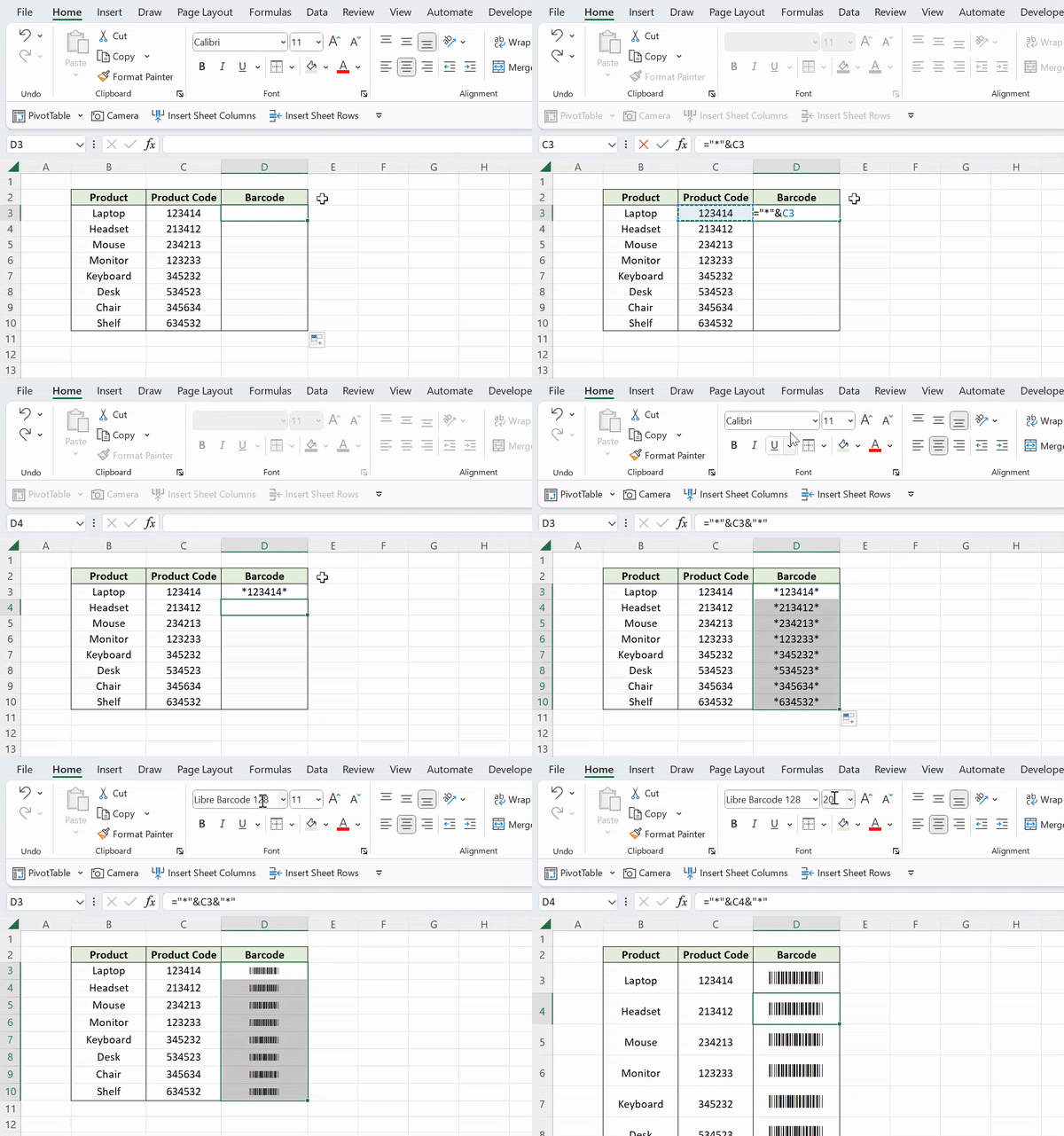
How to create scannable barcodes in Excel

 A powerful tool for businesses is a barcode that can be scanned. Assume you wish to simplify the inventory process and have a list of products with their product codes. You are able to accomplish this in just two easy steps by creating scannable barcodes.

Format the special product codes first. This can be achieved by formatting the codes as text values and placing an asterisk (*) before and after each code cell number. (To save time, use the ampersand sign.)

The second and final step is to switch the font to Libre Barcode 128 after adding an asterisk before and after each product code. If you don't already have it installed, get it for nothing and restart Excel to use it.

Pro-tip: Boost the font size to make the barcodes easier to scan.


Monday, September 19, 2016

Split comma separated string and pass to IN clause of SQL SELECT statement

This was a query from reporting team. Question looked too simple , but the solution was not obvious. 


Problem

We get a colon separated string (1:3)  that we would need to pass to the IN clause of a select statement to get the required rows. 
SQL>select * from test;ID Text1   A2   B3   CSQL>select * from test where ID in :P_INPUT  #P_INPUT=1:3No rows selected
Here we expected 2 rows instead we got no rows. 

Solution

  • Split the input string based on delimiter
  • Get the individual strings as rows

For the above, we use a combination of  regexp_substr function and connect by features in oracle. 

SQL>select * from test where ID in (     select regexp_substr(:P_INPUT,'[^:]+', 1, level) from dual  connect by regexp_substr(:P_INPUT, '[^:]+', 1, level) is not null;)ID Text1   A3   C


Monday, July 29, 2013

Tuesday, July 16, 2013

Quick Dirty cscope starter

find . -name "*.c" -o -name "*.cpp" -o -name "*.h" -o -name "*.hpp" > cscope.files
cscope -q -R -b -i cscope.files
cscope -d

Monday, June 24, 2013

Opengrok: Browser based search for your workspace


Installing OpenGrok

Installing tomcat


Scripts to monitor the changes


Saturday, December 01, 2012

Installing Sun JDK 7 on Ubuntu

Given that Oracle does not have a release for Ubuntu platform, one way to seamlessly install the latest version is

$ sudo add-apt-repository ppa:webupd8team/java

$ sudo apt-get update

$sudo apt-get install oracle-java7-installer

Added after inputs from Kiran for Centos

wget --no-cookies --no-check-certificate --header "Cookie: gpw_e24=http%3A%2F%2Fwww.oracle.com%2F" "http://download.oracle.com/otn-pub/java/jdk/7u51-b13/jre-7u51-linux-x64.rpm"

Thursday, November 01, 2012

Screen way of terminal management

My frequently used command to connect to screen? 

screen -dxR work

What is screen?

It is  a terminal multiplexer, essentially giving the ability . man screen is the best option still.

Getting started video can be useful.

Why screen?

Its original reason for existence was allowing you to switch between sub-sessions on a video-display terminal, but it grew to allow sessions that could be detached and reattached (if you went home for the day, or say you were connecting via a glitchy network) and eventually to allow the same session to be simultaneously accessed from multiple places.

Real power of screen


  1. Persistence of the terminal based work. 
  2. Start your builds -- go home and see all the results intact. Resistant to laptop or network snags.
  3. Unlimited windows (unlike the hardcoded number of Linux virtual consoles)
  4. Scroll-back buffer (not limited to video memory like Linux virtual consoles) & Logging.
  5. Copy/paste between windows.
  6. Notification of either activity or inactivity in a window
  7. Split terminal (horizontally and vertically) into multiple regions
  8. Locking other users out of terminal.


Advanced users of screen

Buffering

Ctrl +a+ [  --------- Page or arrow keys work best
Ctrl +a+ ]  --------- To close the buffer read session

Helpful on remote machines where the logs are being tail-ed.

Terminal Scrolling

Though the above buffering solution of (Ctrl+a+[ ) helps, screen uses alternate screen. So one way is to tell screen not to use this. Scroll-back can also be achieved on the terminal using
‘termcapinfo xterm ti@:te@’ to your .screenrc file.

Starting and Naming sessions


screen -S  

Reconnecting to screen session


screen -x

Split Screen


You can split your terminal windows horizontally and vertically (for vertical split, you need to patch your screen).
To Split the screen horizontally: Ctrl+a & S
To split the screen vertically: Ctrl+a & | or Ctrl+a & V ( the screen has to be patched for this)
To switch between windows: Ctrl+a & Tab
To kill your current window: Ctrl+a & X

Logging


The best thing what I like about screen is that you can have logs of anything you have done on screen, which can be used in lot of things in future. To enable logging, use “Ctrl+a” followed by “H“. This will create a file with name “screenlog.0” in your home directory, which will contain anything or everything you have done on the screen. If you want to stop logging, use the same, “Ctrl+a” & “H“.
You can also enable logging while starting your screen session, which can be done by using “-L” switch:
screen -L -S

Copying and Pasting across terminals 

To enter copy mode in screen, hit Ctrl+A, then [. You can now use the arrow keys, or vim-like keybindings, to move around the screen. 0 gets you to the start of a line, and $ to the end of a line.

  • When you've reached the point where you want to start the copy, hit Enter.
  • Move the cursor to the end point of your selection (you'll see what you're copying highlighted), and then hit Enter again.
  • Now move the cursor to wherever you want to paste the selection (you can move to another screen within your session), and hit Ctrl+A ] to paste the selection.
  • You can also use Ctrl+A > filename to paste the selection to a filename and Ctrl+A < filename to read a file into the selection buffer so you can then paste it out again using Ctrl+A ].

When in copy mode, you can also use screen's scrollback feature (i.e., you can scroll back upward past the top of the currently displayed text) and the search function.

Command line Ctrl+a does not work in screen?

It works in a different way where ctrl+a+a will get the effect.

Searching in the buffer (Like VIM )

When in Buffer mode (Ctrl + [) use / for backword search and ? for forward search. 

Getting ..... lines on the screen terminal

You see this when the user is connected in a multi-user mode and 2 users are on the same terminal. To overcome this, first issue screen -d and then connect using screen -x  

Increasing the scroll back limit

defscrollback 1000
This increases the scrollback to 1,000 lines; you can edit this value as you prefer.

Tuesday, October 16, 2012

Password-less ssh login


ssh from machine1 to machine2 should be password-less (say for some automation tasks)

user1@machine1>pwd
/home/user1/.ssh/
user1@machine1> ssh-keygen -t rsa
Generating public/private rsa key pair.
Enter file in which to save the key (/home/user1/.ssh/id_rsa):
Created directory '/home/user1/.ssh'.
Enter passphrase (empty for no passphrase):
Enter same passphrase again:
Your identification has been saved in /home/user1/.ssh/id_rsa.
Your public key has been saved in /home/user1/.ssh/id_rsa.pub.
The key fingerprint is:
3e:4f:05:79:3a:9f:96:7c:3b:ad:e9:58:37:bc:37:e4 user1@machine1
user1@machine1>cat ~/.ssh/id_rsa.pub | ssh user1@machine2 'cat >> ~/.ssh/authorized_keys && chmod 640 ~/.ssh/authorized_keys'
user1@machine2's password:
user1@machine1>ssh user1@machine2
user1@machine2>hostname
machine2

Friday, October 21, 2011

Mail thru javascript

you can automate sending bulk emails. In case you dont want to send BCCs or even CCs, (some rare cases, i agree)..

if your content is all text or html, (the example given is for text), and the mail-ids you need to send individual mails are one per line in a google spreadsheet (customisable to add other data),
you can open the spreadsheet, go to tools->ScriptEditor
and start typing your javascript! heres an example that sends each mail to one individual at a time, in clear text

//This thing just adds a convenient menu/submenu in your spreadsheet window!


function onOpen() {
  var subMenus = [];
  subMenus.push({name: "Email File to selected Range", functionName: "mysendmail"});
  SpreadsheetApp.getActiveSpreadsheet().addMenu("Email", subMenus);
}

function mysendmail() {
  var numAddrs=SpreadsheetApp.getActiveRange().getValues().length;

  for (var i=0; i
    var toAddr=SpreadsheetApp.getActiveRange().getValues()[i].toString();
    //Browser.msgBox("what is in toAddr is: " + SpreadsheetApp.getActiveRange().getValues()[i].toString());

// this is the line that sends the mail
    GmailApp.sendEmail(toAddr, "sendmail", "testing");
  }
}

if you want to attach a file, you need to use MailApp's sendEmail interface that accepts the attachment.

MailApp.sendEmail(recipients, emailSubject, emailMessage, {attachments: fileName});

check the documentation for other cool scripting interfaces with google apps.

Monday, February 28, 2011

RSS feed for gmail ...

I like this feature, where gmail is now accessible over rss feed.

try this in firefox ( is rss feed support there in chrome by now? )
https://USERNAME:PASSWORD@gmail.google.com/gmail/feed/atom

Though this feature is nice , i wonder if there are any uses of this feature in-spite of PoP3 or SMTP clients

Saturday, August 21, 2010

linux system info

if you ever want to get low level h/w info from your linux installation and your proc file system is cryptic, use 'biosdecode' and/or 'dmidecode'

biosdecode is known to be inadequate. some recent versions of enterprise linux dont ship biosdecode by default. use dmidecode instead. however, it is known to be inaccurate or un-reliable. But, it gives a quick and easy peek into the system and if you need reliable data, you must anyway look into the proc fs.

'dmidecode -t' prints all available sub-system level info.

Monday, December 07, 2009

New features in Java 7: Switch on Strings

At last there is this feature is in Java 7

String s = "something something something"
switch(s) {
case "Jayanagar":
goToOxford(s);
break;

case "Rajajinagar":
case "Navrang":
haveDosainAjanta(s);
break;

default:
goToBrahminsCoffeebar(s);
break;
}
More on ... http://java.sun.com/features/jdk/7/

Friday, September 18, 2009

Getting customized mobile updates from twitter and other RSS services

This post marks the 4th year of this blog.
Hope is to actively engage in writing this blog.

Presented below is an orchestrate of seemingly disparate technologies to enable your favorite updates on your cellphone.
Note: Your cellphone need not have Wifi or GPRS options. This works on basic SMS incoming facility.

Now some of my favorite online items which i need to keep track are:
1) Twitter updates from selected friends.
2) Posts from selected blogs which i want to keep myself updated.
3) Instant updates from Google alerts.

Here is one way we can have all the elements integrated:

1) Collect RSS feeds of all the items listed above.
2) Using yahoo pipes you can do the following:
2a) Using Fetch Feed , aggregate all the feeds.
2b) Use a sort by published date to get the feeds in order. Click here for a preview
2c) This service gives out a common aggregated RSS feed for the selected set.
2d) Also one can use alternatives like RSSmix to achieve a common RSS feed.
3) To get the updates on the cellphone, use Google SMS Channel . By configuring our cellphone for the alerts in Google SMS Channel , we can get the desired updates on our cellphone.

Monday, July 06, 2009

Java URL Bloomer

I came across an interesting problem in java


public class URLBloomer {
public static void main(String[] args) throws MalformedURLException, URISyntaxException {
String[] urls= {
"http://meshlabsinc.com",
"http://meshserver.org"
};
Set testing=new HashSet();
for (String url : urls) {
testing.add(new URL(url));
}
System.out.println(testing.size());
}
}


Output : 1

Reason .... meshlabsinc.com and meshserver.org point to the same IP


Lesson learnt is to use URI instead of URL class.


public class URLBloomer {
public static void main(String[] args) throws MalformedURLException, URISyntaxException {
String[] urls= {
"http://meshlabsinc.com",
"http://meshserver.org"
};
Set testing=new HashSet();
for (String url : urls) {
testing.add(new URI(url));
}
System.out.println(testing.size());
}
}

Output : 2

Tuesday, February 24, 2009

Getting the create table command for an already existing table in mysql

mysql>SHOW CREATE TABLE

mysql> create table x (i integer);
Query OK, 0 rows affected (0.27 sec)

mysql> show create table x;
+-------+--------------------------------------------------------------------------------------+
| Table | Create Table |
+-------+--------------------------------------------------------------------------------------+
| x | CREATE TABLE `x` (
`i` int(11) default NULL
) ENGINE=MyISAM DEFAULT CHARSET=latin1 |
+-------+--------------------------------------------------------------------------------------+
1 row in set (0.06 sec)

mysql>